The problem in one line: Markdown is plain text. When you paste plain text into Word, Word has nothing to style, so the syntax characters are typed into your document verbatim.
The fix: put real HTML on the clipboard before you paste. Word prefers the clipboard's text/html flavor when one is offered, and that's exactly what the MarkdownPaste converter writes.
What you'll need
- Some Markdown — an AI chat reply, a README, meeting notes, or a
.mdfile on your device - A browser tab open to markdownpaste.online
- A Word document to paste into
Nothing needs to be installed in Word, and the converter needs no account.
The workflow
Markdown → MarkdownPaste → Copy Rich Text → Microsoft Word. Four steps, one clipboard.
-
Copy your Markdown
Select the Markdown and copy it with CtrlC (CmdC on Mac). If your Markdown is already a file, you can skip the clipboard entirely: MarkdownPaste's Load Markdown file button opens a
.mdor.markdownfile straight from your device, and the file is read in the browser rather than uploaded. -
Paste it into the converter
Open the MarkdownPaste converter, click into the Markdown input panel on the left and paste. The Rich text preview on the right renders as you type. If you just want to see the behaviour first, Insert example fills both panels with sample content.
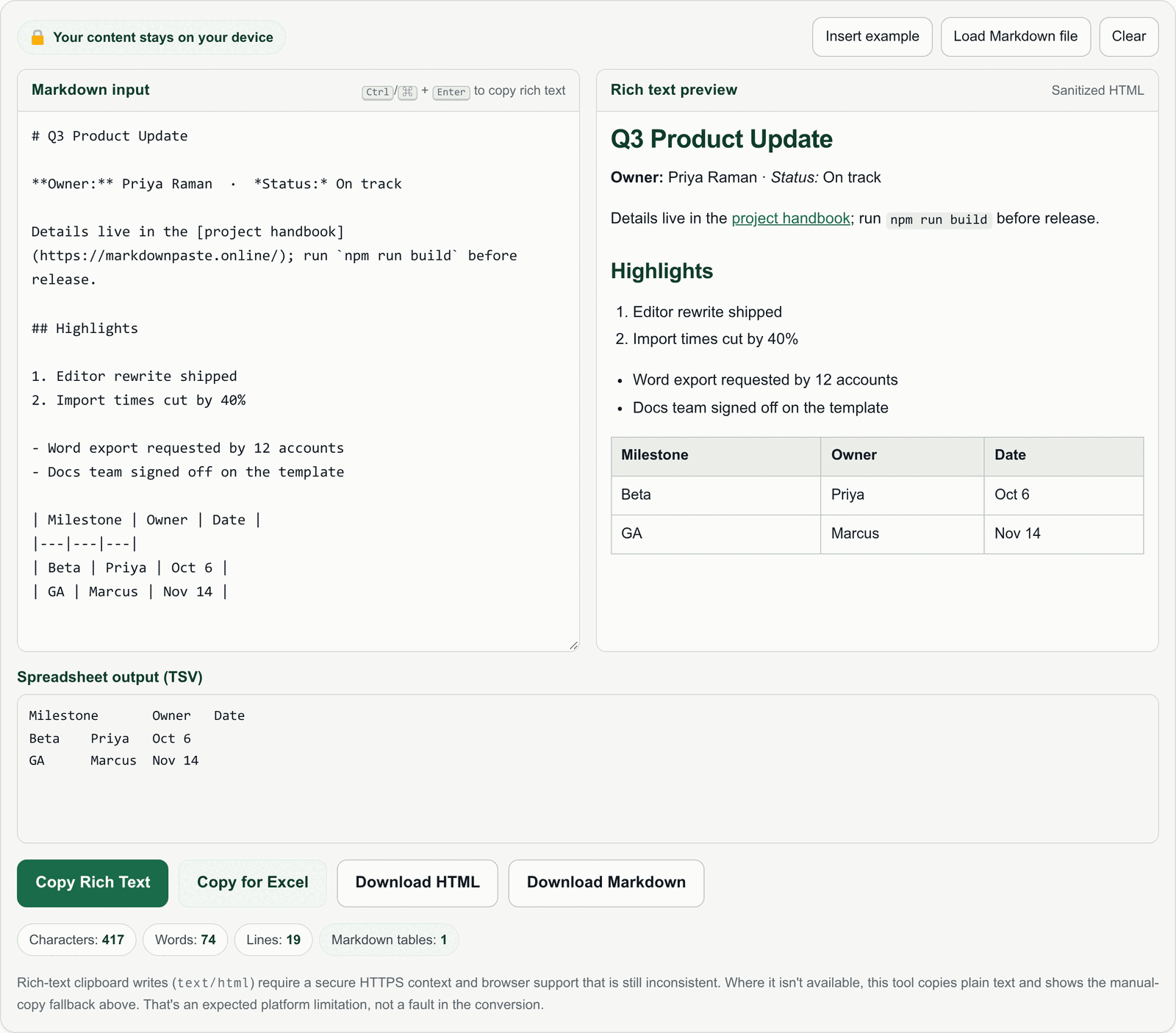
Real screenshotThe live converter with a typical document on the left and the rich-text preview on the right. The preview pane is exactly what goes onto the clipboard. -
Check the preview, then Copy Rich Text
Skim the preview: headings in the right sizes, bold and italics in the right places, lists nested the way you meant, table columns lined up. When it looks right, select Copy Rich Text. That writes an HTML flavor and a plain-text flavor to the clipboard at the same time, so Word can take the richest version it understands. The keyboard shortcut is CtrlEnter / CmdEnter from the input panel.

Real screenshotUse Copy Rich Text for Word. Copy for Excel sits next to it and copies table rows as tab-separated values instead. -
Paste into Microsoft Word
Switch to Word, click where the content belongs, and paste with CtrlV / CmdV. Word reads the HTML flavor and rebuilds the structure: headings become heading styles, lists become Word lists, the Markdown table becomes an editable Word table.
If you'd rather the content adopt your document's existing look, use Word's paste options and choose the merge-formatting option instead of keeping the source formatting. Structure is preserved either way; only the visual styling differs.
Illustrative mockupA stylised representation of the pasted result in a Word document — not a screenshot of Microsoft Word. Your document's theme fonts and spacing will differ. If the formatting doesn't come through Writing HTML to the clipboard uses the asynchronous Clipboard API, which needs a secure HTTPS context, a user gesture, and browser support for thetext/htmlflavor that is still inconsistent. When that isn't available, MarkdownPaste copies plain text and shows a selectable HTML block you can copy by hand. That's a platform limitation rather than a failed conversion — the site FAQ covers it in more detail.
Before and after
Same Markdown, same document, two different pastes.
What each Markdown element becomes in Word
MarkdownPaste supports the everyday Markdown set. Here's how the common pieces land once Word receives the HTML.
| Markdown | What arrives in Word |
|---|---|
# to ###### |
HTML headings H1–H6, which Word maps onto its built-in heading styles — so they show up in the Navigation pane and in a generated table of contents. |
**bold**, *italic*, ~~strike~~ |
Character formatting applied inline. The surrounding paragraph keeps its own style. |
- / 1. lists, including nesting |
Real bulleted and numbered lists. Indented sub-items come through as nested levels. |
[text](url) |
A clickable hyperlink with your link text, not the bare URL. |
| a | b | tables |
An editable Word table with a header row. Use Word's table styles afterwards if you want borders and shading to match your template. |
Inline `code` and fenced blocks |
Monospaced text. Word doesn't syntax-highlight a pasted code block; it arrives as a plain monospaced paragraph. |
> blockquote |
An indented quoted block. |
--- horizontal rule |
A horizontal divider line. |
Tables headed for Excel instead
If the table is the only thing you need and it's going into a spreadsheet, use Copy for Excel rather than Copy Rich Text. It emits tab-separated values, which Excel splits into columns on paste. Pasting TSV into Word would just give you tab-separated text.
Why Word ignores Markdown in the first place
Markdown is a convention for writing structure in plain characters. **bold** only means "bold" to software that has been told to interpret it, and Word has not. What Word does read is the clipboard: a single copy can carry several flavors of the same content, and Word prefers text/html when it's offered. Copying raw Markdown puts only plain text on the clipboard, so Word faithfully types out the asterisks. Converting to HTML first gives Word something it can actually style.
Where your content goes (and doesn't)
MarkdownPaste has no backend. Parsing, sanitizing, the preview, the clipboard write and the file downloads all run in the browser tab you have open, so your Markdown is never sent over the network. The Markdown parser (marked) and HTML sanitizer (DOMPurify) are bundled inside the page rather than fetched at runtime, which also means the converter keeps working with no internet connection once the page has loaded.
Sanitizing matters here because you're pasting the result into a document: scripts, inline event handlers and javascript: URLs are stripped from the HTML before it reaches the preview or the clipboard. Full details are in the privacy section and the Privacy Policy.
Practical tips
- Paste into an empty paragraph. Dropping a heading into the middle of an existing sentence makes Word split styles in ways that are fiddly to undo.
- Restyle once, at the end. Paste everything first, then apply your template's heading and table styles in one pass rather than per block.
- Long documents are fine. Headings H1–H6 all convert, so a long structured document keeps its full outline and you can build a table of contents from it immediately.
- Prefer a file? Download HTML produces a standalone HTML document you can open in Word and save as
.docx— useful when the clipboard route isn't available.
Convert your Markdown now
Paste it in, check the preview, copy rich text, paste into Word. No sign-up, nothing saved.
Open the converter →Runs entirely in your browser · works offline once loaded
Questions about Markdown and Word
Can't I just open a .md file in Word?
You can open it, but Word shows the raw Markdown as plain text — hash marks, asterisks and pipes included. Word has no Markdown importer, so converting to rich text first and pasting is what produces a formatted document.
Do Markdown headings become real Word heading styles?
The converter produces HTML heading elements for # through ######, and Word maps pasted HTML headings onto its own built-in heading styles. That's what makes them appear in the Navigation pane and lets Word generate a table of contents from them.
Will a Markdown table paste as a real table?
Yes — a Markdown table becomes an HTML table on the clipboard, and Word inserts it as an editable table rather than text with pipe characters. Apply one of Word's table styles afterwards if you want it to match your template.
What happens to code blocks?
Fenced and inline code are supported, so they render in the preview and paste as monospaced text. Word applies its own formatting to the pasted block and does not add syntax highlighting.
Can I make the pasted content match my document's styles?
Yes. Use Word's paste options after pasting and choose the merge-formatting option, which keeps the structure but adopts your document's fonts and spacing. Alternatively, paste with source formatting and reapply your heading and table styles afterwards.
Copy Rich Text pasted as plain text — what went wrong?
Nothing was lost. Writing text/html to the clipboard requires a secure HTTPS context, a user gesture and browser support that is still inconsistent. When that write isn't possible, MarkdownPaste copies plain text and shows a selectable HTML block you can copy manually, then paste into Word the same way.
Is my content uploaded when I convert it?
No. There's no backend to receive it. Parsing, sanitizing, preview rendering, clipboard writes and downloads all execute in your browser tab, and the parser and sanitizer are bundled in the page rather than fetched from elsewhere.
Can MarkdownPaste export a .docx file?
Not directly — the downloads on offer are Download HTML and Download Markdown. For a file-based route, download the HTML, open it in Word, and save it as .docx.